
Services
 Getting Started
Section titled “ Getting Started”This guide assumes that the Nexus platform has been successfully deployed and that both sample clients have ingested data. We will demonstrate how to retrieve this data using the Nexus Data API.
To continue with this guide, follow these steps:
-
Deploy the Data API Sampler We provide a sample Nexus application that is not part of the base services. You will need to deploy this component manually to your environment.
-
Request Data via REST Our examples utilize curl, though you can use any preferred REST client (e.g., Postman or Insomnia) to interact with the API.
Deploy the Data API Sampler
Section titled “Deploy the Data API Sampler”Just like the Nexus base components, the Data API Sampler is deployed via GitHub Actions. We have pre-configured the necessary workflow within the repository.
To start the deployment, navigate to the Actions tab of your forked Nexus repository. Locate and trigger the following workflow:
“Build, Push and Deploy the Data-API Sampler service” (build-push-deploy-data-api-sampler.yml).
Check Deployment Success
Section titled “Check Deployment Success”Once the pipeline has completed, verify that the service was successfully deployed. You can find it in the Google Cloud Console under the GKE Workloads screen.
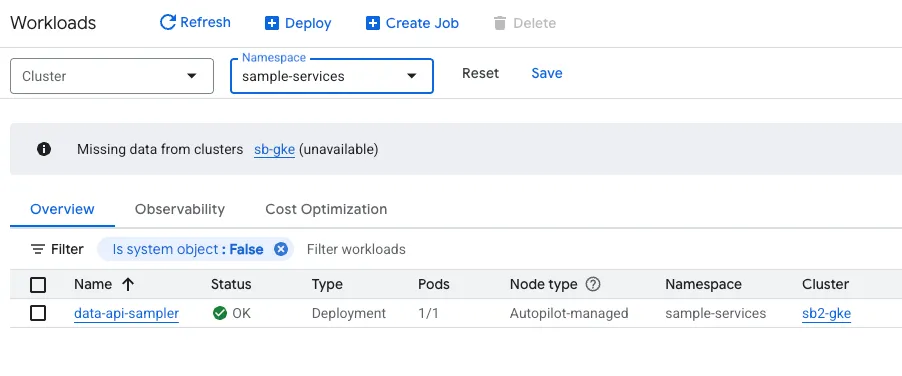
The service is deployed within a dedicated namespace called sample-services, keeping it isolated from the Nexus SDV base-services.
Retrieve Service Endpoint
Section titled “Retrieve Service Endpoint”To interact with the Data API Sampler service, you will need its external IP address. Navigate to the Deployment Details screen for the data-api-sampler within the GKE console. You can find the assigned endpoint in the Exposing services section at the bottom of the screen.
Request Data via REST
Section titled “Request Data via REST”Now it is time to test the Data API Sampler. Run the following command and remember to replace the IP with your specific service endpoint:
curl 34.89.251.211:8080/health | jqThe output should look similar to this:
{ "groups": [ "liveness", "readiness" ], "status": "UP"}You can use these commands to retrieve the data transmitted by the Go client:
curl 34.89.251.211:8080/data/VEHICLE001/datatypes/dynamic:battery.temp | jqOutput:
{ "dynamic:battery.temp": [ "\"25.15\"" ]}curl "34.89.251.211:8080/data/VEHICLE001/datatypes/dynamic:battery.temp?lookback=1d" | jqOutput:
{ "dynamic:battery.temp": [ "\"24.81\"", "\"25.24\"", "\"25.08\"", "\"25.30\"", "\"25.16\"", "\"25.05\"", "\"25.00\"", "\"25.29\"", "\"25.15\"" ]}To retrieve data transmitted by the Python client, the request needs to be slightly modified:
curl "34.89.251.211:8080/data/VEHICLE001/datatypes/static:index?lookback=1d" | jqOutput:
{ "static:index": [ "\"0\"", "\"1\"", "\"2\"", "\"3\"", "\"4\"", "\"5\"", "\"6\"" ]}curl "34.89.251.211:8080/data/VEHICLE001/datatypes/static:test_key?lookback=1d" | jqOutput:
{ "static:test_key": [ "\"test_value\"", "\"test_value\"", "\"test_value\"", "\"test_value\"", "\"test_value\"", "\"test_value\"", "\"test_value\"" ]}Conclusion
Section titled “Conclusion”We hope this guide helped you understand how data can be retrieved from BigTable using the Data API Sampler. You can use this service as a template to build your own custom applications on top of Nexus.
We plan to provide more sample services soon, including the ones featured in our IAA Mobility 2025 showcase. You can view the corresponding video on our Nexus SDV landing page.